1. Comparison of mainstream control scheme options
1. **Manufacturer's built-in management software**
Control tools supplied by the original manufacturer, compatible only with that brand's projectors. Some can link to peripheral devices such as audio, lighting, and curtains, and support RS232, RS485, infrared, and TCP/IP protocols for one-click scene switching and scheduled management.
Key drawbacks: brand isolation — **no unified management of projectors across brands**. When deploying mixed-brand engineering projects, O&M staff must run several separate applications at once, which makes management chaotic and makes the software unsuitable for complex integrated projects.
2. LumiCtrl (primary solution)**
LumiCtrl is built for projection system integration projects and consolidates the common control functions of projectors from many brands. Based on the universal PJLink protocol, it is not limited by device brand and can control hundreds of projectors and their companion computer playback devices from a single platform.
Core capabilities: remote bulk control, real-time monitoring of device online status, viewing of operating parameters, fault identification and alarms. This replaces manual on-site operation of each unit, greatly reducing on-site inspection and debugging workload and improving the efficiency of cluster device management.
2. Applicable scenarios and deployment process
Large-screen projection, ring-screen projection, and stereoscopic projection are comprehensive system integration projects that combine hardware and software such as display devices, playback hosts, and sound systems. They are widely used in dynamic cinemas, stereoscopic cinemas, large venues, performing arts stages, virtual laboratories, driving/flight simulations, command and dispatch centers, planning exhibition halls, virtual sales centers, and other scenarios.
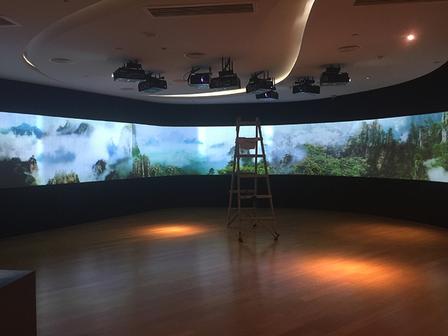
Projects like these often involve a large number of projectors in scattered locations. Traditional manual control is inefficient, offers poor synchronization, and detects faults late.
The standard deployment process for LumiCtrl:
1. Early stage: set up the internal network environment, import device information in batches, group and name devices by exhibition area/zone, and set unified parameters;
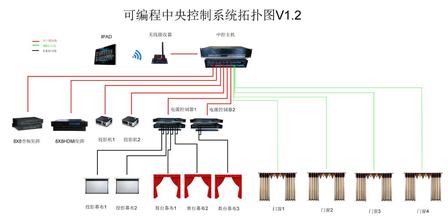
1. Debugging phase: issue control commands in batches, synchronize power on/off, switch signal sources, and quickly complete timing alignment across multiple machines;
2. Daily operation: configure scheduled tasks to start and stop devices automatically, continuously poll device status on the platform, and automatically alert on abnormalities;
3. Post-operation and maintenance: remotely view equipment operation data, remotely troubleshoot basic faults, and reduce on-site commuting.
3. Deployment precautions
1. Protocol adaptation: the projector must support the PJLink protocol, which is the foundation of LumiCtrl's cross-brand control;
2. Network planning: we recommend deploying the projector cluster independently on the intranet to ensure stable control commands and low latency, and to avoid network storms;
3. Group management: supports grouping by exhibition area and zone, allows batch operation of an entire group, and also supports fine-tuning of a single device;
4. Permission control: tiered administrator permissions prevent batch downtime caused by misoperation;
5. Unattended operation: supports scheduled strategies and meets the 24/7 stable operation requirements of exhibition halls, cinemas, and command centers;
6. Expansion compatibility: connects to the central control host and broadcast control system, and fits integrated sound, light, and electrical projects.